AI Manga Scanlation Tool
Manga Scanlation Tool for AI Manga Translation Workflows
Manga scanlation is more than translating a sentence. A real workflow includes text detection, manga OCR, reading order, translation, cleaning, inpainting, editable typesetting, review, and export. AI Manga Translate helps personal readers, creators, translators, editors, and authorized localization projects turn manga pages into editable translated documents. The page is built for manga scanlation planning, manga scanlation editing, and manga scanlation review, not for file sharing.
This is not a manga scanlation release site. AI Manga Translate does not provide pirated manga, raw manga downloads, chapter mirrors, or scanlation files. Upload only content you own or have permission to process.
What Is Manga Scanlation?
Manga scanlation usually describes a full translation and editing process for manga pages. Traditional teams may use separate OCR tools, translation notes, Photoshop, cleaning brushes, typesetting templates, proofreading spreadsheets, and export tools. AI Manga Translate brings those steps into one browser-based scanlation software workflow for authorized content. In practical manga scanlation work, the editor needs both automated assistance and manual control.
The goal is not to distribute unauthorized manga. The goal is to help a reader understand a page they can lawfully process, help a creator translate their own comic, or help an editor prepare an authorized localization draft. The same manga scanlation workflow can be quick and simple for personal reading or precise and editable for professional review. That is why this manga scanlation page separates the quick translator from the Studio workflow.
Professional editor workflow
Professional Manga Scanlation Workflow
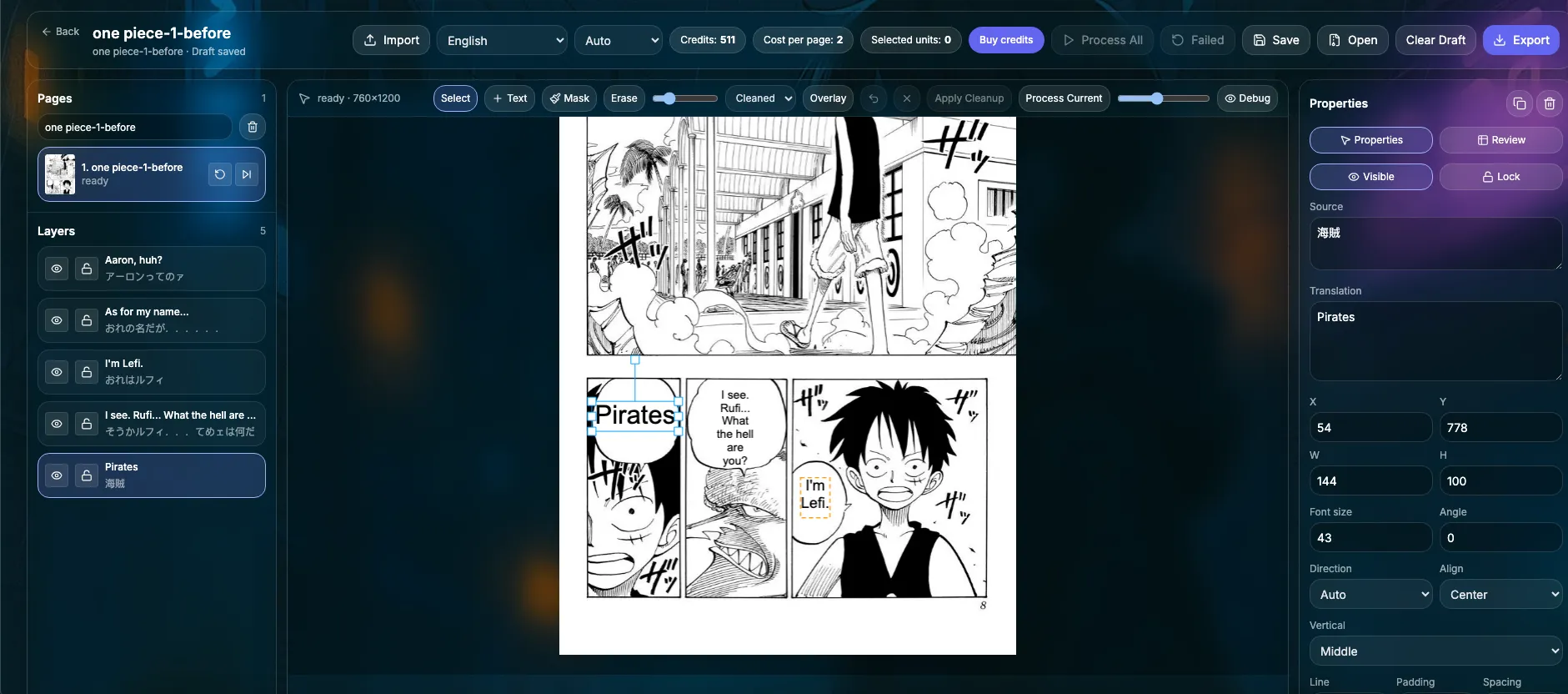
These dynamic demos show Manga Translator Studio, the professional editor. They are not the homepage quick translator. Use this workflow when a manga scanlation project needs OCR, translation, cleaning, editable text layers, manual typesetting, and export. The purpose is to make manga scanlation controllable after AI has done the first pass.
Import pages
Start a manga scanlation workflow by importing authorized manga images, PDF pages, CBZ files, or EPUB projects into Manga Translator Studio. This first manga scanlation step keeps the source page ready for detection, review, and editing.
Text detection, OCR and translation
Run text detection, manga OCR, reading order analysis, and translation so speech bubbles and captions become structured editable content. A good manga scanlation workflow depends on this step because dialogue order and bubble context affect the final translation.
Cleaning and inpainting
Use AI cleaning and inpainting to remove original text from manga panels while preserving the artwork behind the dialogue. For manga scanlation, this cleaning stage is what makes translated text look like it belongs on the page.
Editable text layers and manual typesetting
Adjust translated text layers by changing font size, position, color, alignment, line spacing, and bubble fit for professional typesetting. This turns manga scanlation from an automatic result into an editable layout workflow.
Export final pages
Export translated pages as images, PDF, CBZ, EPUB, rendered ZIP files, or project files for authorized manga scanlation and localization workflows.
Quick reading workflow
Free Manga Translator for Quick Reading
The homepage free manga translator is different from Manga Translator Studio. It is a quick manga translation flow for personal reading, fast raw manga understanding, and simple upload-to-result tasks. It does not provide the same manual cleaning, inpainting, and editable typesetting controls as the professional editor.

Upload files
The homepage free manga translator starts with a simple upload flow for authorized images or PDFs. It is a quick manga scanlation entry point for readers who want a fast translation preview.

Choose language and model
Pick a target language and translation model for a fast manga scanlation reading result without opening the professional editor.

Review the quick result
Preview the translated output for personal reading or raw manga understanding, then move to Studio when the manga scanlation page needs manual editing.
Quick Translator vs Manga Translator Studio
| Workflow | Best for | Editing control | Output |
|---|---|---|---|
| Quick/free manga translator | Personal reading, quick raw manga understanding, and simple manga scanlation previews. | Automatic manga scanlation result only; not built for detailed manual typesetting. | Fast translated image result. |
| Manga Translator Studio | Creators, translators, editors, and authorized localization projects. | Cleaning, inpainting, editable text layers, manual manga typesetting tool controls, and export settings for professional manga scanlation. | Images, PDF, CBZ, EPUB, rendered ZIP, and editable project files. |
Why Choose Us
AI Manga Translate works as an AI scanlation tool for users who need more than a plain machine translation. It connects manga OCR, manga cleaning tool behavior, and editable typesetting into one manga scanlation workflow.
End-to-end manga scanlation workflow
AI Manga Translate covers detection, OCR, translation, cleaning, editable typesetting, review, and export, so manga scanlation does not stop at plain text translation.
Manga OCR for speech bubbles
The workflow is designed for manga pages with speech bubbles, vertical text, horizontal text, captions, and mixed reading directions.
AI cleaning and inpainting
Remove source text and repair panel backgrounds so manga scanlation text layers can be placed cleanly over the artwork.
Editable typesetting controls
Use the manga typesetting tool controls to adjust size, color, placement, alignment, and line spacing after translation.
Free manga translator entry point
Start manga scanlation with the quick tool for fast personal reading, then upgrade to Manga Translator Studio when the page needs professional editing.
Built for authorized projects
The page is for personal reading, creators, translators, editors, and authorized localization projects, not piracy or scanlation distribution.
Related manga scanlation resources
Use these related guides to choose the right level of automation, editing, and example output for an authorized manga translation project.
FAQ
These answers clarify how manga scanlation workflows, the free manga translator, and Manga Translator Studio fit together for authorized manga scanlation.
What is manga scanlation?
Manga scanlation is a manga translation workflow that can include text detection, OCR, translation, cleaning, inpainting, typesetting, proofreading, and export. On this page, manga scanlation means a workflow for authorized manga images, not a source for unauthorized releases.
Is AI Manga Translate a manga scanlation site?
No. AI Manga Translate is not a manga scanlation release site, download site, mirror, or archive. It is a manga scanlation workflow tool for user-uploaded content that the user has the right to process.
Can I use it as a free manga translator?
Yes. The homepage quick translator can work as a free manga translator entry point for simple reading tasks, subject to available quota and site limits.
Is the free manga translator the same as Manga Translator Studio?
No. The free manga translator flow is for quick upload, language selection, and result review. Manga Translator Studio is the professional manga scanlation editor for cleaning, inpainting, editable text layers, manual typesetting, and export.
Does it support manga OCR?
Yes. Manga Translator Studio uses manga OCR and text detection to identify dialogue and captions before translation and editing.
Can it clean original text from manga panels?
Yes. The studio workflow includes cleaning and inpainting tools that can remove original text and repair the background for authorized pages.
Can I adjust typesetting manually?
Yes. You can adjust manga scanlation text layers manually, including size, color, position, alignment, line spacing, and bubble fit.
Can I translate raw manga?
You can translate raw manga images only when you have the legal right to process them. AI Manga Translate does not provide raw manga downloads.
Is this only for authorized content?
Yes. Users should upload only content they own, created themselves, or have permission to process for personal reading, editing, or localization.
Start an Authorized Manga Scanlation Workflow
Use the quick translator for fast reading or open Manga Translator Studio when your manga scanlation workflow needs OCR, cleaning, inpainting, editable typesetting, and export. The best manga scanlation result usually combines AI automation with a final human review.